
Hi! I hope you guys are excited for lots of inspiration today. I’m so excited right now I’m just bursting at the seams with joy. Why you ask? Well, this post is chalk full of goodness. First, I have my Christmas cards to share with you. Then, there are a total of 35 silhouette projects in this month’s link up. 35! That’s just amazing! I’m just so happy to be a part of this group. And finally, this is my first ever giveaway. I’ll save that for last, but let me just tell you, I’m so thankful to be able to do this. Onwards and forwards to the crafting!
Oh wait, story time first! This will be the third year that Earl and I hand make our cards. We started doing this the year after we got married. I’m not really sure how it happened, but I’m so glad we did. At that time, we weren’t living together, and so Thanksgiving weekend was one of the longer times we had together. So, we decided to make cards for Black Friday. Since then it’s become a tradition in our little household. This is the first year that we designed our cards entirely ourselves without relying heavily on other crafted cards. In fact, I don’t even really have any inspiration to share with you how we got started on this one! This was the very first project I had planned for my silhouette (even before I had it!), because I really wanted to do a Christmas card with stickers, and so I did! Here’s the card!


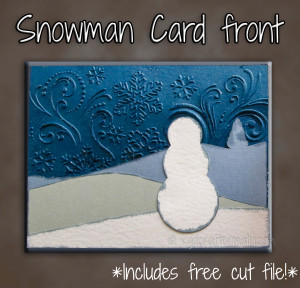
Now, there are so many parts to this card, I’ve decided to break it up into four separate tutorials. Yes, four! Today I’ll show you how we did the front of the card. Then, I’ll do separate posts on the envelope, the stickers, and assembly of the card for the next three days. Each part involves the silhouette, but I’ve also used some other fun tools like our envelope punch board. Ok, with all that said, let’s get this tutorial started!
Materials

1 8.5×11 sheet light blue paper (Bazzill Basics Stonewash – makes 6 hills with tree)
1 8.5×11 dark blue sheet (Bazzill Basics Nautical Blue Dark – makes 4 rectangular backgrounds)
1 12×12 white sheet (Bazzill Basics White Prismatic makes 16 snowmen and 12 small hills)
1 12×12 grey sheet (AC Cardstock Stone) (makes 12 medium hills)
Snowflake embossing folder (Darice Snowflake Swirl)
Tim Holtz distress stickles (Clear Rock Candy)
Tim Hotlz distress stain (Stormy Sky)
Foam pouncer
Double sided tape
Free cut file (includes .pdf files and .studio files for the front, stickers, and envelope (no .pdf))
I also used my silhouette machine (you can print and cut from the .pdf in the download if you don’t have one) and an embossing machine.
Step 1: Cut out all your pieces
To make the pieces for the front, I used the same process in my Photoshop Magic 1 tutorial to trace out some pictures of actual hills. The snowman is just 3 circles merged together. Then I imported those into Studio and traced them to create the cut lines. Since we were making a ton of cards, Earl and I figured out what the best size sheet was and how many we would need. Cut out as many as you need for each color. If you are using the .pdf files, print on the back side of your page. Below are all the pieces needed for a single card cut out. Pay particular attention to the texture of your paper. The light blue I used had texture on one side that I didn’t like, but the other side was plain. I just placed it texture side down on the cutting mat. Conversely, I wanted to keep the texture for the white, so I kept the texture side up for those cuts.

Step 2: Distress
All of the pieces except the dark blue should be distressed using the distressing stain. What I love about these stains is that there is a cloth sponge right at the top of the bottle, so you don’t need any other tools! First, you’ll want to dab it down on some other paper to get it started.

Then, just brush the tip gently along the edge. You’ll want to pay attention to the side you’re marking, but you can always distress both side if need be.

Do this around all sides of the smallest hill and the snowman as well as the top and two sides of the larger hills.

Step 3:Emboss
This is pretty easy to do if you have an embossing machine. Just center your dark blue in the embossing folder and send it through the machine. I won’t go over how to use an embossing machine (since there are several kinds), but basically you put the folder in between two pieces of acrylic and then press a button which feeds it through some pressure rollers. There are also manual ones where you hand crank the folder through.


Step 4: Stickle
Next, you’re ready to add a bit of shine to those snow flakes! We decided to keep the sticky out part of the embossing facing out. To add a subtle bit of glitz, we spread some stickle on a pouncer and then pounced it around the embossed part. It’s hard to see in the pictures, but it adds just the right amount of sparkle to the snowflakes. You can save some of your stickles by sticking to only the top half of the card, since the bottom half will be covered later on.

Step 5: Assemble! Now that all the layers of the card are ready, it’s time to put them together. This is where your tape comes in. I just ran around the edge on the back side and pressed them on one at a time.


Congratulations! You’ve finished the first part of the card. Give yourself a pat on the back.

Well now, that was productive! I hope you’re ready for more inspiration, because here it comes!
Want to Check Out More Silhouette Projects?
My Silhouette Challenge buddies and I are all sharing projects on our blogs today, so peruse the projects below for a wealth of Silhouette inspiration!

- 2013 Snowman Christmas Card by Please Excuse My Craftermath…
- Christmas Hoop Art by Lil’ Mrs. Tori
- Silhouette Nativity Advent Candle Box by One Tough Mother
- Christmas Party Photo Booth Props by unOriginal Mom
- Another Stenciled Tea Towel by Cutesy Crafts
- Silhouette Gift Tags by Rain on a Tin Roof
- Snowflake Pin / Ornament by Coley’s Corner
- State Sign Couple Gift by It Happens in a Blink
- Mason Jar Christmas Ornaments by Vintage News Junkie
- Merry Christmas Wall Decor by One Artsy Mama
- Deer Head Holiday Banner…featuring Santa’s Reindeer by The Thinking Closet
- Restore your UGGS (with PAINT) by From Wine to Whine
- Monogrammed Snowflake Ornaments by Architecture of a Mom
- Christmas Countdown Sign by The Girl Creative
- Elf Chalk Sign: “The Best Way to Spread Christmas” by Weekend Craft
- Glittery Christmas Subway Art by The Turquoise Home
- Sketch Pen Labels by Sowdering About in Seattle
- Snowflake NOEL Sign by My Favorite Finds
- DIY Holiday Hostess Gift by Everyday Paper
- Folding Nativity Backdrop by Chicken Scratch NY
- Recycled Glass Jar Advent Calendar by Nearly Handmade
- Reindeer Card: Double-Sided Print & Cut by GetSilvered
- Personalized Block Ornament by Suburble
- Paper Medallion Christmas Tree by Create & Babble
- Mini Mid-Century Homes by Tried & True
- Glitter and Vinyl Minecraft Christmas Ornament by A Tossed Salad Life
- DIY Countdown to Christmas Refrigerator Style by My Paper Craze
- Reversible Recipe Holder/Block Frame by The Sensory Emporium
- DIY: Lettered Christmas Pillows by The House on Hillbrook
- Simply Charming Christmas Ornaments by Life After Laundry
- No Glitter was Worn by GiveMeAPaintbrush
- Make Easy Ornaments from Paper Circles by Bringing Creativity to Life
- Cutting Machine Embroidery Applique by Terri Johnson Creates
- “Believe” Christmas Banner by Daily Dwelling
- DIY Christmas Nativity Card by Pitter and Glink
Do you have a Silhouette machine?
Looking for Silhouette inspiration, support, trouble-shooting? Interested in joining us for our group posting event next month? Then, we’d love to have you join our Silhouette Challenge Facebook group. To join, simply fill out the new member request form, and Lauren from The Thinking Closet will get you squared away.
$155 Amazon Gift Card Giveaway!

And if that isn’t enough, I get to partake in my first *ever* giveaway! What does that mean? Well, you can use the rafflecopter widget below to enter to win a $155 Amazon gift card. That’s more than enough to get your own Silhouette portrait! Or, if you’re not hankering for a portrait, than you can put it towards whatever your heart desires. This giveaway is made possible by 31 amazing bloggers, which means you have 31 opportunities to enter. Just follow the instructions in the widget below to enter. And guess what?! If you already like me on Facebook, that’s one chance to enter already taken care of for you! And if you don’t, it’s really easy to start now. Don’t worry, I won’t take over your facebook wall with my insanity. Or will I?
Ok, before I give you the widget, I need to get some nitty gritty details out of the way. The giveaway runs from Monday, December 9th – Monday, December 16th at 11:59p eastern and is open to anyone 18 years of age and older, and this is an international-friendly giveaway! The winner will be contacted by Lauren from The Thinking Closet by email and will have 48 hours to respond; so, make sure to watch your spam folders! Ok, that’s good. There are some other terms, but you can read those in the widget I’m going to share with you right now!
Isn’t this just the best Christmas season ever?! I’m able to continue a new tradition, share the card with all of you, be part of an amazingly creative group of crafters, *and* give you the chance to win a bit of money. Well, there was a lot to that post. I hope you’re not all tired out! Don’t forget to come back tomorrow for the next part of the card tutorial or your snowmen will be all cold without their hats and scarves! Oh, and please do be careful of the craftermath on your way out. Thanks for stopping by!

2013 Snoman Christmas Card
Constructing the Front <– You are here!
Making the stickers
Assembling the Card
Making the envelope (Coming soon!)

I like to link up here.
Affiliate links help me keep this blog running. Thanks for using them!
All opinions expressed on this blog are always my own.